


Modern search is less like a directory and more like a tailored feed. With search personalization, two people can type the same words and still see different rankings, different page layouts (videos, maps, news), and different suggestions. Google says personalization can use your activity and may reorder results or content blocks.
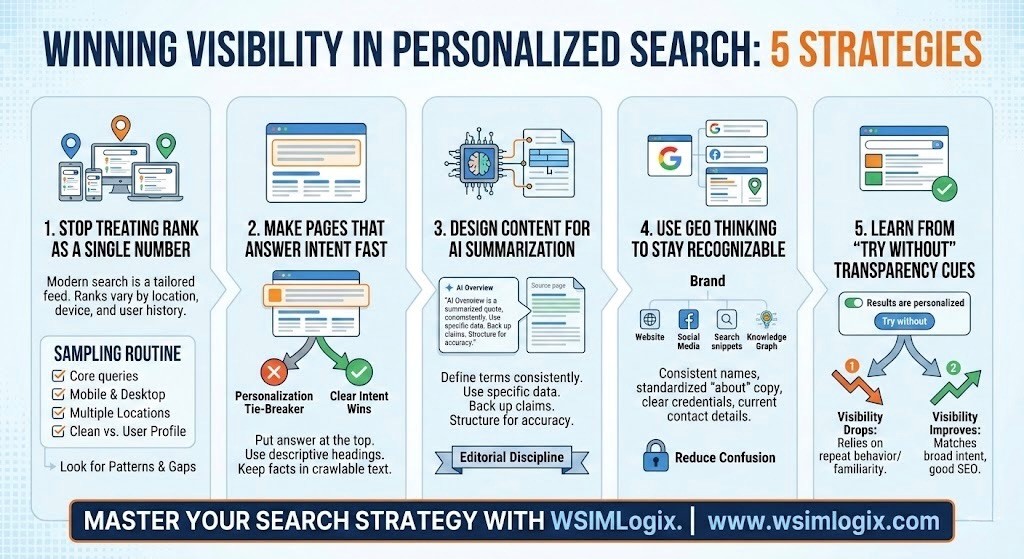
1) Stop treating rank as a single number
If you check performance from one laptop in one ZIP code, you are measuring a slice of reality. Google notes results also vary for reasons like language settings, location context, and device type.
Keep a simple sampling routine:
- A few core queries
- Mobile and desktop
- A handful of target locations
- One “clean” profile and one normal user profile
Look for patterns. Are you visible where you sell? Do you vanish on mobile? Do you show up only for returning users?
2) Make pages that answer the intent fast
Search personalization often acts like a tie-breaker. Google says it doesn’t affect every query and may only rerank when it expects the change will help.
Write pages that earn the click from anyone:
- Put the answer near the top in plain English.
- Break steps into short sections with descriptive headings.
- Keep key facts in text, not trapped in a graphic.
When your page satisfies the obvious intent cleanly, personalization has less room to push you aside.
3) Design content that AI systems can summarize correctly
Google’s Search Central documentation says AI Overviews and AI Mode surface links and may use “query fan-out,” running related searches across subtopics to build a response. It also says there are no special requirements beyond normal Search eligibility and SEO fundamentals.
Aim for “easy to quote without breaking context”:
- Define terms once, the same way, every time
- Use specific numbers and limits when you can
- Avoid big claims you can’t back up
If you need a label for the internal work, treat AI Overviews optimization as editorial discipline: structure, accuracy, and clear sourcing, not tricks.
4) Use Generative Engine Optimization (GEO) thinking to stay recognizable
Personalization doesn’t only change what users see; it can also change what they learn about you. Search Engine Journal argues that fragmented SERPs and AI summaries raise the value of segmentation and consistent brand structure across markets and channels.
Quick wins that reduce confusion:
- Keep product names and category labels consistent sitewide
- Standardize your “about” copy and core claims
- Add author names and credentials when expertise matters
- Keep your location, policies, and contact details current
5) Learn from “Try without” and other transparency cues
Google’s help pages describe a footer note that can say “Results are personalized,” plus a “Try without” link that shows non-personalized results for that query without changing settings. News coverage also frames this as a transparency and user-control step.
Use it as a diagnostic. If your visibility drops when personalization is removed, you may rely on repeat behavior or brand familiarity. If you improve, your page likely matches broad intent, and you can work on audience signals like local proof and clearer positioning.
Frequently Asked Questions:
1. Why are my Google search results different from someone else’s?
Google says Search uses context like location, language, and device type to improve results, and it may personalize based on your activity when it believes that will help. Not every query is personalized, so differences can be subtle for one search and obvious for another. That’s why one screenshot rarely tells the story.
2. How does Google personalize search results using search history?
When Search personalization is on, Google may use signals such as your search history to reorder results or content blocks. One example Google gives is moving videos higher if your history suggests you prefer video content for that query type. It can also change which result blocks show first.
3. Does turning off Search personalization stop all personalization in Google?
Turning it off limits activity-based personalization, but Google says Search can still use query context like general location, language, and device type. So, two users can still see different results even with personalization disabled. Local context still shifts results from place to place.
4. How can I see whether a result was personalized for me?
Google describes a footer label that indicates whether results are personalized, plus a “Try without” link to view a non-personalized version for that query. It’s meant to make comparisons easier. Use both views when you audit or report.
5. How do I get my content cited in Google AI Overviews or AI answers?
Google says there are no special requirements beyond standard eligibility, and it recommends foundational SEO best practices and helpful, reliable, people-first content. Practically, write in clean sections, state facts precisely, and keep key information in text so it can be referenced accurately. Clear headings and definitions reduce misquotes.